

Provide your Intercom AI agent with conversation attributes from Intercom to answer user data specific questions
If you already capture lots of information on your users in Intercom, you may find it useful to provide this information to your AI agent as context so it can refer back to that information in its responses. To do this, you will need to make a workflow where, when a conversation is initiated an Internal note is generated on the first message that contains the relevant conversation attributes.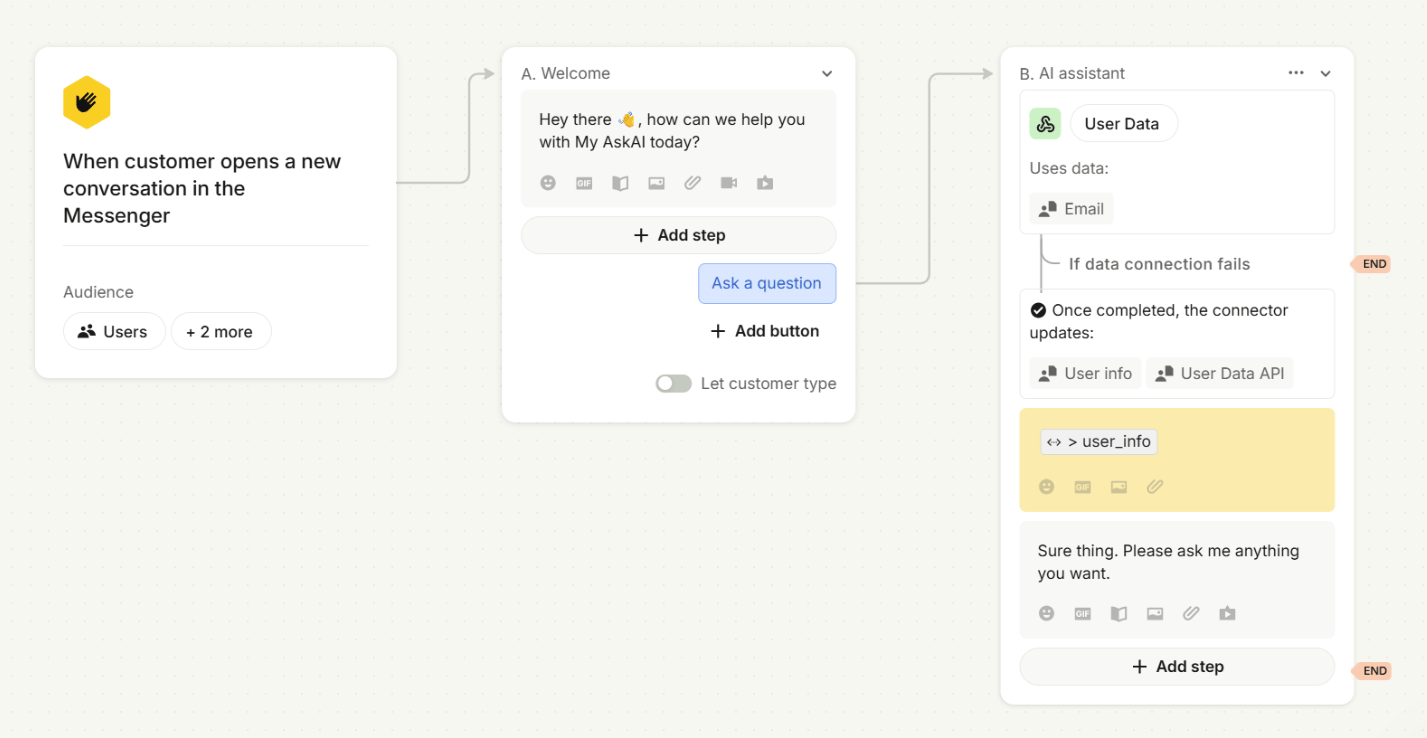
How to give your Intercom AI agent context about what page the user is on to better answer questions
There are a couple of ways you can give your Intercom AI agent context about what page the user is on to better answer questions:- Create an API that we can send an email to (for a logged in user) and you return information about the current page of the user + other useful information.
This approach is the best long term one as you can keep feeding in more information about that user’s account. - You can add a note, as part of the current workflow, just before the user is asked to type their question.
You can add in static and dynamic content here (from Intercom), so if you’re able to add the current user’s page as a user attribute, you can feed it in here.
The AI will look at this note as well as the user’s message for context.